The room had laptops open, which told you what kind of session this was. Hendrik Hemken spent two and a half hours not talking about AI for product managers but building, live, in front of 150 people — with the honest caveat that some of it would break.
He spent twelve years in product, most recently four as CPO at DealCircle in Hamburg, building AI-driven matching for M&A advisors. Somewhere in the last two years, 30 to 40 percent of his time went into finding out what these tools could actually do. Then he left to teach it full time.
Why chat tools cap out for product work
Everyone in the room used ChatGPT. Far fewer had ever uploaded their own documents to it — and Hemken doesn't, because of how that actually works. Uploaded documents get chunked and retrieved in pieces, which is fine for finding a passage and poor for reasoning across a body of reference material. Worse, updating anything means re-uploading it.
The deeper issue is where the knowledge lives. In a chat tool, your context lives inside conversations. Start a new one and it's gone; keep the old one going and it fills up with everything you've ever said in it.
Context — what you send the model — is the single biggest lever you have on output quality. You're not going to fine-tune a model. You are going to control its context.
FundamentalsThe context window, and the part nobody mentions
He walked through the mechanics without hand-waving: your prompt, the system prompt, the rules, the files, the tool definitions and every previous message in the conversation all go to the model, every turn. That's why long conversations get expensive, and why they drift.
| Model family | Context window |
|---|---|
| Claude (Opus, Sonnet) | ~200,000 tokens |
| GPT-5 class | ~400,000 tokens |
| Gemini | up to 1,000,000 tokens |
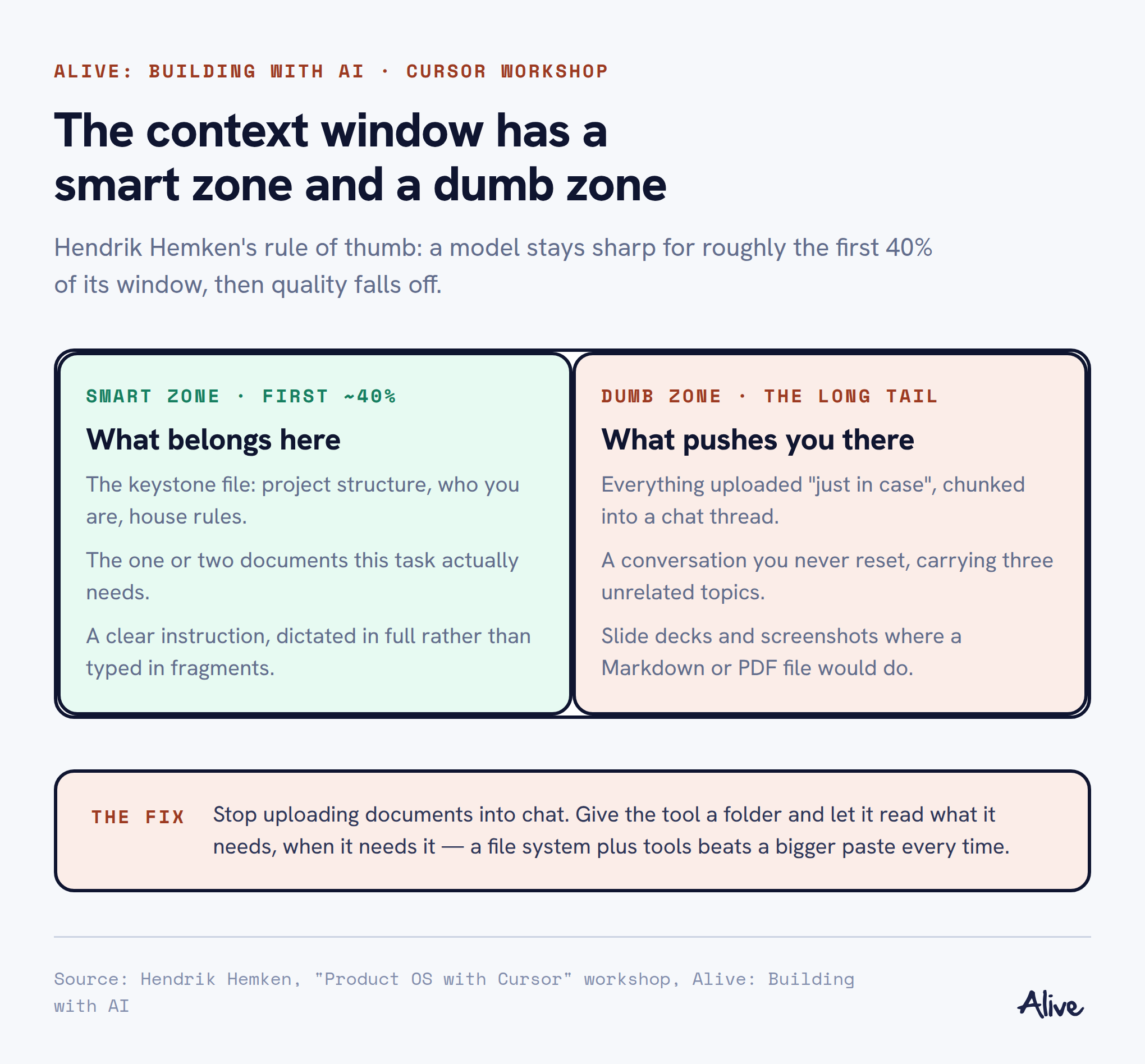
Then the caveat that matters more than the numbers: you don't want to fill it. Quality degrades well before the window is full — his rule of thumb, explicitly unscientific, is that the first ~40% is the smart zone and everything after it drifts toward the dumb zone. A bigger window doesn't fix this; half of a million tokens is still a confused conversation.
You can't manage what you can't see
Cursor and Claude Code show you how much of the context window a conversation is using. ChatGPT doesn't. If you can't see where you are in the window, you can't tell whether a bad answer came from a bad question or from a saturated context — so start a fresh conversation more often than feels necessary.
A file system beats a chat window
The reason Hemken works in Cursor has nothing to do with code. Two things separate it from a browser chat: it can see a file system, and it has tools — it can search files, list them, and use the terminal.
He was blunt about the marketing problem: these tools look like they're for engineers, and that framing is keeping knowledge workers away from the best interface they have for working with AI.
The setup he had the room do is deliberately unimpressive:
- Create a folder on your desktop. Call it My PM Assistant, or anything.
- Open that folder in Cursor. That's the whole "installation".
- Pick a model. Chat panel on the right, files on the left — the same shape as every chat tool you already use.
- Check the settings: privacy mode if your company needs it, and deletion protection.
Two working habits came with it. First, dictate instead of typing — he uses a transcription tool that cleans the raw speech with a model before dropping it into the prompt. Speaking gets you three times more context into a prompt than typing, and you stop optimising the wording.
Second, stop trying to write the perfect prompt. Talk to it the way you'd talk to a competent colleague: what you want, why, what good looks like — then iterate together. Perfect prompting is the habit of a system where you only got one shot.
FormatMarkdown is the native language
Everything in the workspace is Markdown. Not because it's fashionable, but because models are extraordinarily well trained on it — GitHub is full of it — and because you can still read it yourself.
That last part is the point of the whole approach. These aren't opaque artefacts: you open a file, disagree with a line, and either fix it or tell the assistant to. Nothing is hidden in a chat thread you'll never scroll back to.
The keystoneOne file that loads every time
The single most important file in the workspace is CLAUDE.md (or AGENTS.md — same idea, different tool convention). It's loaded at the start of every conversation, so it's where the permanent context goes.
Project structure
What each folder is for, so the assistant knows where to look instead of searching blindly.
Who you are
Your role, your company, how you want to be answered — formal or direct, always critical, always with a point of view.
House rules
Don't create unnecessary to-do files, don't duplicate documents. Models are eager to produce files; say so once.
You don't write it by hand. You ask the assistant to create it, tell it what the project is for, and correct it. Ten minutes, once.
Skills: prompt engineering 2.0
Part II opened with the limit of the keystone file. Product work spans strategy, customers, metrics, technical constraints — you cannot load all of it into every conversation without landing in the dumb zone. So context has to be loadable on demand.
That's what a skill is: a folder of instructions and reference material the assistant reads when the task calls for it. Hemken's framing — prompt engineering 2.0. Instead of a giant prompt you paste each time, a packaged process the assistant can pick up.
His worked example was an OKR expert. Base-model advice on OKRs is mediocre, so he built the skill from the best writing he could find on the subject — Christina Wodtke, John Doerr's framing, Marty Cagan's critique — and put it in a file with a name, a description of when to use it, and a procedure.
Skills can push back
The OKR skill includes Cagan's critical test: when someone proposes an objective, check whether it's actually a good one. So the assistant will tell you your boss's favourite KPI makes a bad OKR, and why. It also instructs itself to re-read the company context file before answering — the difference between generic OKR advice and OKRs for your business model.
The folder structure matters less than the habit. His workspace has a company context folder holding strategy documents, positioning and team information, all as Markdown. On formats: PDF reads reliably, PowerPoint reads badly — export the deck to PDF before dropping it in. Images are a coin flip.
One small example landed with the room: a rule that whenever a new person joins the team, a profile file is created for them in the team folder. New PM starts on Monday; you say so in a sentence; the file gets created, the structure updates, and the assistant now knows who reports to whom.
The unlockPut the actual codebase in the workspace
The most useful move of the session, and the one most product managers haven't tried: clone your product's repository into the workspace so the assistant can read the real thing — not the documentation, not the architecture diagram, the code.
He demonstrated it with a small game the assistant pulled from GitHub, then asked it the question a PM actually has: where is the complexity here, what's cheap to change, what isn't?
You want to ask the person who knows your product best. But you don't want to ask them every stupid question — and for me, most of them were stupid questions.
— Hendrik HemkenTwo ways to use it. Prepare conversations with engineers — walk in knowing whether your idea is a CSS change or five new endpoints and a data-structure migration. And prototype against your real design language, pulling colours, styles and components out of the actual product rather than accepting the generic look every AI tool produces by default.
Large brownfield estates are harder — many repositories, legacy layers — but you can add repositories one at a time and let them reference each other locally.
Where nextConnections, and one warning
Once the workspace holds, the obvious next step is connecting live systems — Jira and Confluence through MCP. His practical tip for people who don't want to touch infrastructure: Docker Desktop's MCP catalogue, which installs and runs the servers locally without the setup work.
He also repeated a caution from the room: be careful with write access. An integration that can create and edit tickets will do exactly that, including when you phrased something badly.
ClosingBuild your own, badly, then fix it
His closing advice was against copying anyone's setup wholesale, his own included. Create the folders. Write the keystone file. Add a skill for the thing you do every week. Give each folder a readme so the assistant knows what's inside it. Then use it, notice what doesn't work, and restructure — two steps forward, one back, repeatedly.
The reassuring part is how forgiving the material is. This isn't code; a badly worded line doesn't break the system. It just makes the answers slightly worse until you go back and rewrite it.